Authorization Requests
Mansar allows you to inject yourself into the decision making process, whenever a card gets used to move funds. Mansar will make a call to a dedicated endpoint you create, letting you know about every attempt to use the card and the details of the attempt. You will respond with an approval or a decline, based on your internal business logic. We refer to this process as "programmatic authorization of card use".
This capability can be used to:
Restrict payments to certain types of institutions / services
Create elaborate spend controls
Run your own fraud logic
Move funds between accounts of the customer in real time to prevent a card decline due to insufficient funds.
Programmatic authorization of card use
NOTE
The programmatic authorization feature is not enabled by default. To set it up, please reach out to your Mansar contact.
You would have to create a dedicated API endpoint (details below) that Mansar will call with every authorization request. You can configure that URL in the Mansar Dashboard, in the org settings screen.
There are 3 types of card use that you can choose to receive authorization requests on: Purchases, ATM transactions, and Card Transactions (representing mostly peer-to-peer transfers). For each of those, you can choose whether to enable the programmatic authorization flow, as well as the default behavior in cases of timeout.
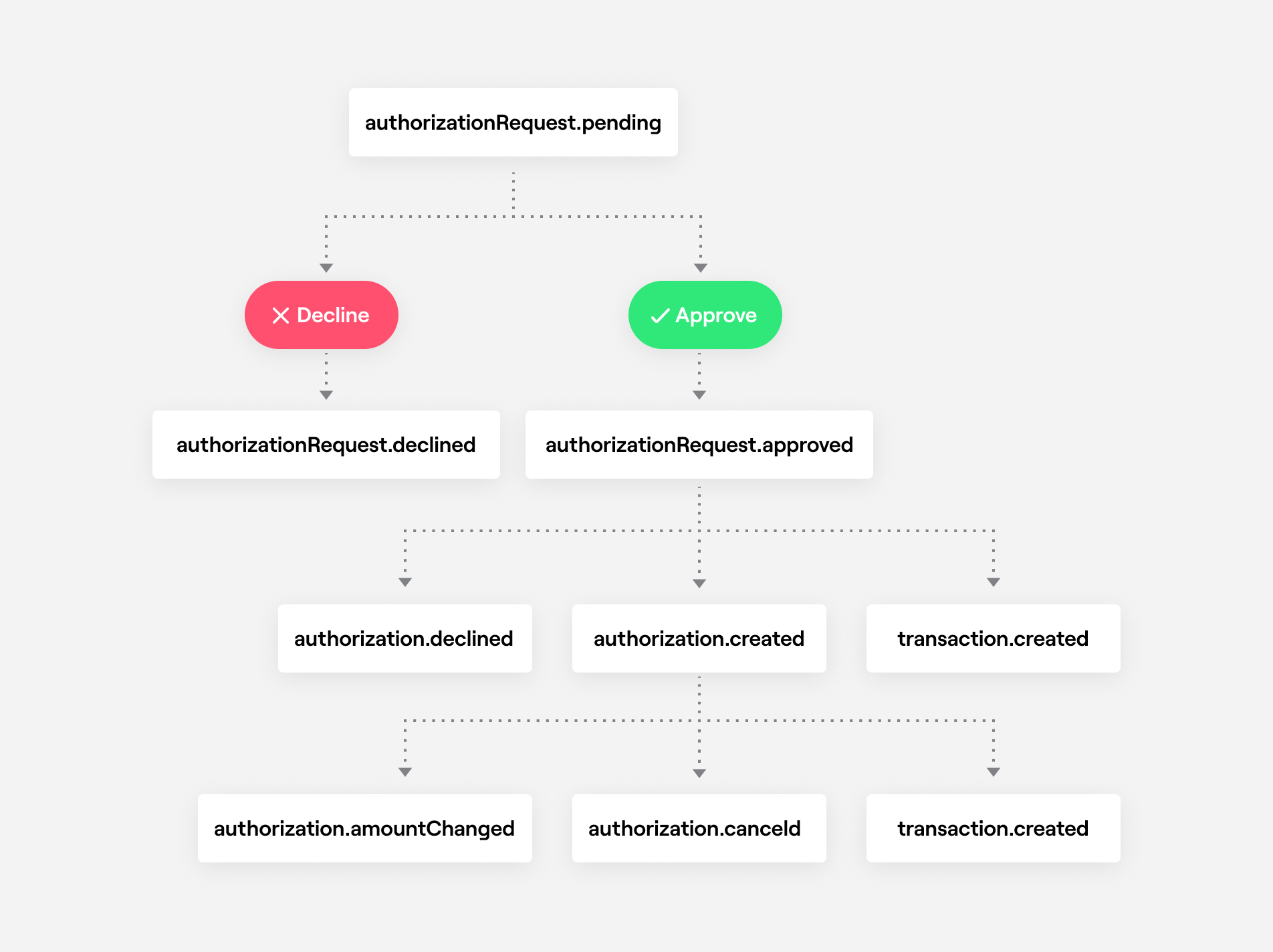
The Programmatic authorization of card use includes the following steps:
An authorization pending http request is sent by Mansar to the url you defined in your org settings.
You can then approve or decline the authorization request by responding to the API call Mansar sent to you.
If you do not approve or decline the authorization request within 2 seconds, Mansar will approve or decline it according to the default that is defined for you on Mansar's settings (which can be changed any time by contacting Mansar).
The response from the
approveoperation will include the final authorization request status. Approving an authorization request may still result in aDeclinedstatus for different reasons. For example, at this stage Mansar will check the balance on the account, and may decline the authorization due to insufficient funds.Mansar will send an
authorizationRequest.approvedorauthorizationRequest.declinedwebhook event based on the final approval status.If an authorization's amount changes the whole process will restart from stage (1).
NOTE
In order to test the programmatic authorization of card use in Sandbox, you may take advantage of the ability to simulate a Card Purchase Authorization Request, Card Transaction Authorization Request, or ATM Authorization Request.
Securing your http servers
Ensure your server is only receiving the expected Mansar requests.
Once your server is configured to receive payloads, it'll listen for any payloads sent to the endpoint you configured.
For security reasons, you probably want to verify that the payloads are coming from Mansar.
To verify the payloads when defining a url you can set up a secret token which Mansar will use to sign the payloads.
Setting up your secret token
You'll need to set up your secret token in two places: Mansar dashboard and your server. To set your token in Mansar Dashboard:
Navigate to OrgSettings on the top menu under Developer section.
Navigate to GeneralSettings under OrgSettings
Enable API based authorization requests and set your url
Enable Add optional secret and set your secret token
Verifying payloads from Mansar
If your secret token is set, Mansar will use it to create a hash signature with the entire body of the webhook request.
This hash signature, encoded with base64 is passed along with each request in the headers as X-Mansar-Signature.
Mansar uses an HMAC SHA1 to compute the hash.
Example of a NodeJS server verifying webhook payload
Authorization Request
The below covers the structure of the request Mansar makes to your API, as well as the two response options - approve or decline.
data
PurchaseAuthorizationRequest / CardTransactionAuthorizationRequest / AtmAuthorizationRequest / IIASAuthorizationRequest
The authorization request possible resources.
Example Request:
Approving an Authorization Request
Response is a JSON:API document.
200 OK
Attributes
amount
integer
Optional. The approved amount (in cents). Can only be specified if the authorization request's partialApprovalAllowed is set to true.
fundingAccount
string
Optional. The id of an alternate account (either the customer's or another's) that should be used for funding the transaction. Please contact Unit to enable this feature.
tags
object
Optional. The specified tags will be inherited by the resulting authorization and transaction resources.
Example Response:
Declining an Authorization Request
Response is a JSON:API document.
200 OK
Attributes
reason
string
The reason for declining the authorization request. One of AccountClosed, CardExceedsAmountLimit, DoNotHonor, InsufficientFunds, InvalidMerchant, ReferToCardIssuer, RestrictedCard, TransactionNotPermittedToCardholder.
Example Response:
Get by Id
Get an authorization request resource by id.
Verb
GET
Url
https://api.s.usemansar.xyz/authorization-requests/{id}
Required Scope
authorization-requests
Timeout (Seconds)
5
Response
Response is a JSON:API document.
200 OK
data
PurchaseAuthorizationRequest / CardTransactionAuthorizationRequest / AtmAuthorizationRequest
Authorization Request resource.
List
List authorization requests. Filtering and paging can be applied.
Verb
GET
Url
https://api.s.usemansar.xyz/authorization-requests
Required Scope
authorization-requests
Timeout (Seconds)
5
Query Parameters
page[limit]
integer
100
Optional. Maximum number of resources that will be returned. Maximum is 1000 resources.
page[offset]
integer
0
Optional. Number of resources to skip.
filter[accountId]
string
(empty)
Optional. Filters the results by the specified account id.
filter[customerId]
string
(empty)
Optional. Filters the results by the specified customer id.
filter[merchantCategoryCode][]
Integer
(empty)
Optional. Filter result by their 4-digit ISO 18245 merchant category code (MCC).
filter[fromAmount]
Integer
(empty)
Optional. Filters the result that have an amount that is higher or equal to the specified amount (in cents). e.g. 5000
filter[toAmount]
Integer
(empty)
Optional. Filters the result that have an amount that is lower or equal to the specified amount (in cents). e.g. 7000
Response
Response is a JSON:API document.
200 OK
data
Array of PurchaseAuthorizationRequest / CardTransactionAuthorizationRequest / AtmAuthorizationRequest
Array of authorization request resources.
Example Response:
Last updated